Honor browser setting for UI theme from the start
In many modern apps as well as operating systems you can choose between at least one light and one dark mode.
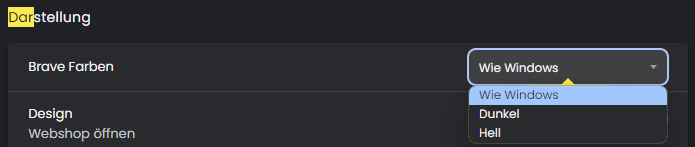
CheckMK already attributes to that by making the user choose their preference inside the UI. However, this suggestion is about adding a third option that reads the preference of the user already when opening up the webpage before the user authenticates, as well as being able to set it to "auto" after authentication which essentially means it changes whenever you change your preference inside the OR or browser.
While you're at it: you could also introduce two more themes for the visually impaired offering high contrasted light and dark modes.
Comments: 2
Oldest
•
Newest
•
Most likes
•
Fewest likes
-
24 Jun, '24
Mohamed Saleh AdminHi Simon,
Thank you for your contribution to the Ideas Portal!
We understand the idea is about an automated way of setting the theme based on the user's browser setting. What we would like to know is a bit more context into the problem you are trying to solve, or what is the business use case for having such a capability? In other words, why is it a problem to set the theme manually by the user? These details can help us better understand the essence of the problem and be able to design the right solution when considering the idea.
Looking forward to hearing more about the idea from you.
Warm regards,
Your Checkmk Team -
06 Jul, '24
Simon MüllerHi Mohamed,
it's not a problem to set the theme manually by the user.
It's a problem for visually impaired co-workers to log into CheckMK because they can't properly see the login dialog. Thus, my suggestion to account for the browser's "light/dark" setting and choose the CheckMK theme according to it when the co-worker visits the CheckMK UI **before** being authenticated (and afterwards too, of course).